A Database Success product

FMCapture

Turn any phone into a capture front end for the FileMaker file you already have.

Scan a barcode or QR, snap a photo, capture a signature, and it writes into FileMaker. Nothing to install, and no per-seat FileMaker license on the phone, on any device, because it is a web app, not FileMaker Go and not WebDirect.

Nothing to install on the phone Any device, iOS or Android Works with your existing FileMaker file
Proven on a real iPhone, built for any phone
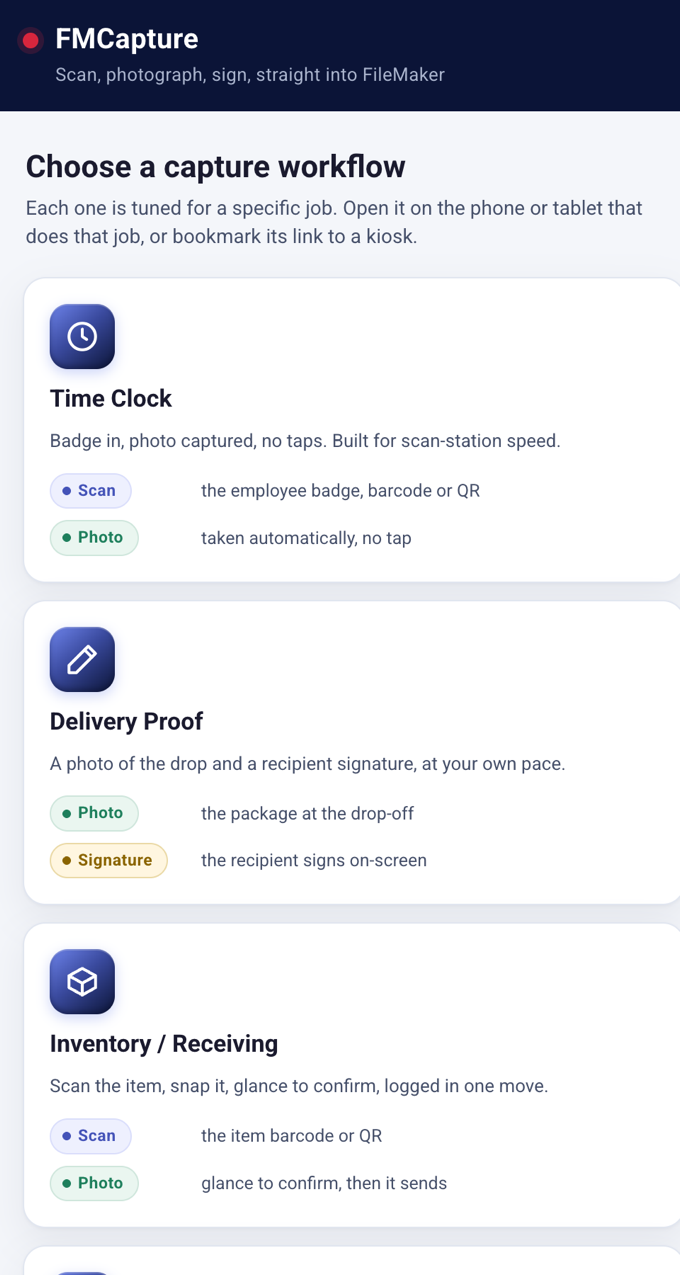
FMCapture on a phone: choose a capture workflow, time clock, delivery, inventory

What it is

Field capture that lands in FileMaker, live

Your crew opens a link, captures what they need, and taps send. The office sees it in FileMaker immediately, exactly as if it came from FileMaker Go, but with no app and no seat on the phone.

Scan

Barcodes and QR codes read right in the browser, live from the camera, on the packing slip or the unit.

Photograph

Proof of delivery, damage, the item. The photo goes into a FileMaker container field.

Sign

A signature captured on screen and saved with the record.

Into FileMaker

Everything writes into the FileMaker solution you already run. Map your fields once, then go.

Use cases

One app, tuned for the job

FMCapture ships as a menu of ready-made workflows. Each one is a plain web link that opens straight to that job, with only the steps it needs. Try any of them right now on your phone.

Time clock

Scan a badge and it logs the entry, photo optional, and stays live for the next person. Leave a tablet at the door.

Try it on your phone

Delivery proof

A photo of the drop plus a signature, captured at the door and attached to the job.

Try it on your phone

Inventory

Scan the item, photograph it, done. One touch and the camera is ready for the next shelf.

Try it on your phone

Field inspection

Photo evidence captured on site and tied to the record, so the file shows exactly what was seen.

Try it on your phone

Full capture

Every step and every control in one screen. The workshop for shaping a workflow of your own.

Try it on your phone

Your workflow

Don't see your job here? We tailor a capture profile to exactly how your crew works.

Talk to us

Each use case is a plain web link. Bookmark it on a phone or a fixed tablet and it opens straight to that workflow, ready to scan.

Built for the field

The details that make it fast in real hands

Warehouses are loud, gloves are on, and connections are weak. Every one of these was built and tested against that, so a capture is quick, clear, and never a bad photo.

One-touch mode

Scan and it grabs the photo and sends by itself, then stays live for the next slip. A scan station just keeps going.

SmartCapture

It grabs the sharpest of several frames and shows you the shot with Use or Retake, so a blurry photo never slips through.

Instant read confirmation

Every good scan flashes green, beeps, and shows the value, so a read is never missed, even across a busy floor.

Choose your quality

High, Balanced, or Small. Keep photos clear without clogging a weak connection.

Type it when needed

When a barcode is torn or missing, enter the code by hand and keep moving. Nothing stalls the line.

Any device

iPhone, Android, a tablet, or a fixed kiosk. It is a web page, so nothing to install and nothing to license per phone.

How it works

A capture takes one clean path

Every capture lands in a companion FileMaker file first, with its photo and signature. Nothing touches your live records until it is approved, and you review on your own schedule, not one at a time.

Field user
Phone
Opens a link, scans, photographs, signs. Nothing installed.
FMCapture
Relay
Holds the FileMaker login server-side and makes the write. The browser never sees FileMaker.
FMCapture
Capture hub
The capture lands here first, marked New, with the photo and signature attached.
Your office
Review inbox
Captures wait here with their photos and signatures, ready when you are. You approve what moves in.
Your system
Your FileMaker file
A mapped handoff writes it into the right fields. Marked Processed.

The shaded boxes are the software we provide. Your solution needs no changes to start capturing.

Data safety

Built so your data stays yours

Everything runs on your FileMaker Server, under your control, with a credential that can do almost nothing and images that are never stored.

Your password never reaches the phone

The browser holds only a short-lived session. Every FileMaker call is made server-side.

The capture account can do almost nothing

Create and edit capture records on one layout. No delete, no reach into your solution.

We do not store your images

Each photo and signature is passed straight through to your FileMaker file, in memory only, never written to our disk.

Encrypted the whole way

HTTPS from the phone to us and from us to your FileMaker Server, with your certificate verified on every call.

No duplicates on a bad connection

Every capture carries a unique ID, so a phone that retries on weak signal never creates two records.

You decide what becomes your data

Captures wait in a review inbox with their photos, so nothing enters your live records until you approve it. Review whenever it suits you.

Setup

Map your fields once, then forget it

Our hub has a fixed set of capture fields: the scanned value, the photo, the signature, when, and who. Setup is one task: connect each to the right field in your own solution. A developer does it in a FileMaker configuration screen that reads your real schema and suggests the matches by name and type. It is stored as ordinary data and reused for every capture after.

Try the setup screen The real configuration screen, pre-loaded with a sample file. Pick a layout, map fields, switch the write mode, and Save shows a preview. No login.
RoleWhoWhat they can do
Field userDriver, tech, receiverOpens the web page and captures. Never opens FileMaker, needs no account in it.
ConfiguratorYour FileMaker adminOpens the file once to set up the field mapping and review captures. Scoped to the setup and review screens, and cannot redesign the file.
Capture accountThe relay (software)Create and edit capture records on one layout. No delete, no other access. Never opened by a person.

Hosting

We run it for you, or you run it yourself

Either way the FileMaker file lives on your FileMaker Server, and every customer is fully isolated on their own setup. We never pool your credentials with anyone else's.

Managed by us

We host the web half

  • Point us at your FileMaker Server and go live.
  • We handle setup, certificates, and updates.
  • Your own isolated server, never shared.
  • A simple monthly subscription.
Run it yourself

Self-host on your own box

  • One installer, your server, your control.
  • Your FileMaker credential never leaves your infrastructure.
  • Keep your FileMaker Server fully private.
  • You own updates and certificate renewal.

Straight talk

What "no license on the phone" means

Your field crew does not need a FileMaker Pro, Go, or WebDirect seat, because they use a web page, not FileMaker. That is real, and it is the headline.

Being precise: this clean claim holds for solutions on a self-hosted FileMaker Server. FileMaker Cloud and some subscription servers meter how much data flows out, so we design the app to be write-mostly and we scope the claim honestly rather than overselling it. Confirm your own license covers your Data API usage, and we will help you check at setup.

See it on your own FileMaker file

Bring the FileMaker solution you already run. We map your fields and put a working capture link in your crew's hands.